TEAM & CULTURE
Team news and birthdays
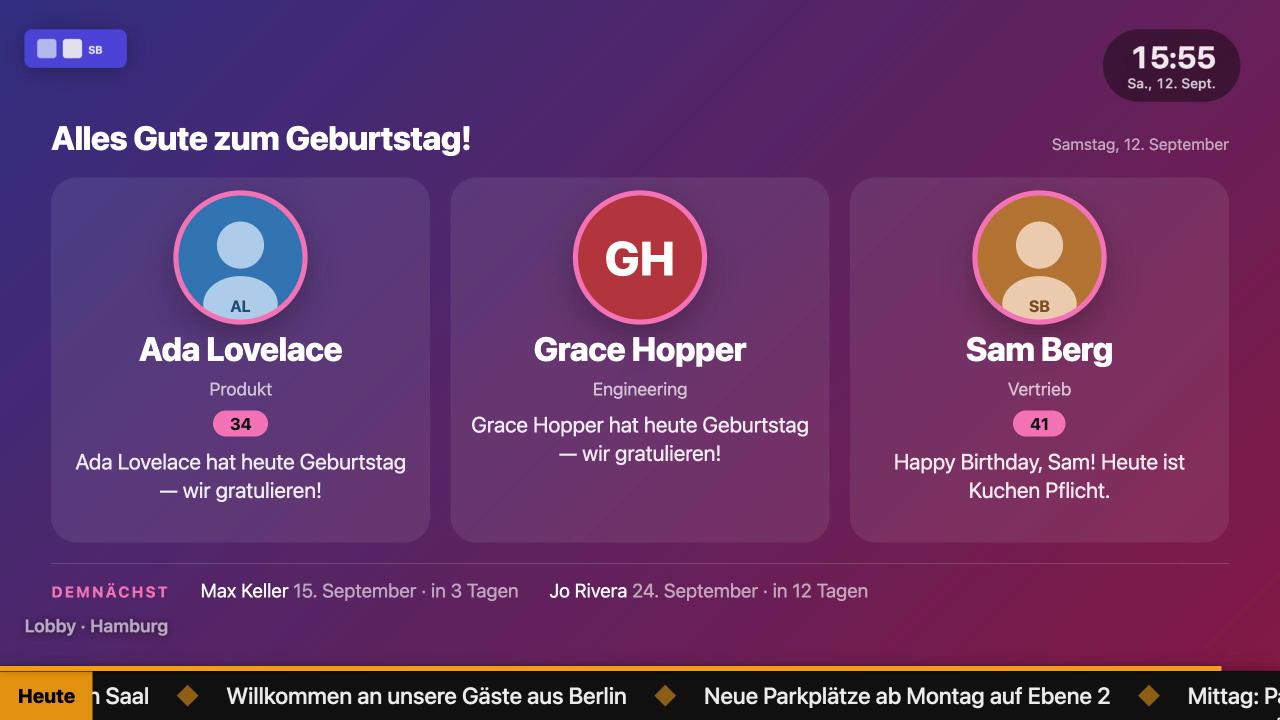
Announcements with an expiry date, birthdays and anniversaries from the people directory, a countdown to the next release.
Digital signage software
Announcements, calendars, menus and dashboards, arranged in a playlist in your browser. A change shows on the screen within a second. The TV needs nothing but the free app or its own browser.
14-day free trial. No credit card. Every feature.
MONDAY, 6 OCTOBER
Guest Wi-Fi: SeaView-Guest
Meeting rooms are on the 2nd floor.
10:30 / 45 min


Example layouts and product screenshots. Choose a view to explore.
Feeds itself from the tools you already use
WHAT THE SCREEN SHOWS
Each format has a live preview that runs the same code as the TV. Fill one in, drag it into a playlist, give it a schedule.
Announcements with an expiry date, birthdays and anniversaries from the people directory, a countdown to the next release.
The forecast for your address, today's meetings from Google Calendar or Outlook, the next departures at the stop outside.
Google Analytics and Search Console, a Google Sheet as a table, or any JSON API through a template.
MANAGED FROM ONE BROWSER TAB
A screen in reception, a menu at the counter, a notice across every location: edit once in the console and each TV updates within a second.
One form, no credit card. Invite colleagues with a link and give them roles: owner, admin, editor or viewer.
Install the Screenbutler TV app or open the player URL in the TV's browser. It shows a six-character code; type it into the console.
Create slides with a live preview, drag them into a playlist, set durations and schedules, assign the playlist to the screen.

Reception, canteen, classroom, shop window: each page lists the slides for that setting and how to set them up.
The free app turns an Android TV or Google TV into a player you manage in the browser: autostart, offline cache, remote-control keys.
Every feature, up to 10 screens, no credit card. €9 per screen per month afterwards.
Announcements with an expiry date, today's calendar, birthdays and KPIs on the screen by the coffee machine.
Edit specials, prices and sold-out dishes from your phone; the board updates within a second.
Chromium in kiosk mode plus one URL runs the same player on a Pi or a spare PC.
Substitution plans, canteen menu and notices from the sheets and calendars the office already keeps.
Any Android TV or Google TV (built-in or as a stick) with the free Screenbutler TV app; any TV with a web browser (Samsung, LG); and any mini PC or Raspberry Pi running Chromium in kiosk mode. There is no proprietary player box to buy.
€9 per screen per month, net of VAT. Every slide format and console feature is included, and you can cancel monthly. You start with a 14-day free trial, no credit card.
Yes. The TV app caches the current playlist and the data behind it; when the network drops it keeps playing and skips slides that need a live connection. When the server is unreachable it shows a clock screensaver and recovers on its own.
On servers of Hetzner Online in Falkenstein, Germany, under a data-processing agreement. No transfers to third countries except transactional e-mail.
In the browser console: edit a slide or playlist and the TV updates within a second. Slides can be scheduled by weekday, time window and date range, and you can send a message or full-screen takeover to some or all screens, also via the API from Slack, n8n or a script.
Yes. One login can manage several companies, each with its own screens, media, people and members. Roles and an audit log show who changed what and which screens were affected.
No. The TV shows a six-character code once; you type it into the console and the screen is paired for good. Several TVs can be paired to the same screen and play in sync.
No. Screens render the same during the trial and after it.
Every feature, up to 10 screens, no credit card. After the trial, €9 per screen per month, cancel monthly.